• Home
  • Suggest A DIY
  • DIY Newsletter

Cross-Stitch

Charts, patterns and everything needlepoint

  • About CraftGossip
  • Our Network
    • Bath & Body Crafts
    • Candle Making Ideas
    • Crochet Ideas
    • Cross Stitch
    • Edible Crafts
    • Felting Patterns
    • Glass Art
    • Home & Garden Ideas
    • Indie Crafts
    • Jewelry Making
    • Kids Crafts
    • Knitting Patterns
    • Lesson Plans
    • Needlework
    • Party Ideas
    • Polymer Clay
    • Quilting Ideas
    • Recycled Crafts
    • Scrapbooking
    • Sewing Patterns
    • Card Making
    • DIY Weddings
    • Not Craft Ideas
  • Giveaways
  • Roundups
  • Store
  • Search

How to Turn a Photo or Drawing into a Cross-Stitch Pattern

February 6, 2024 by Sarah White

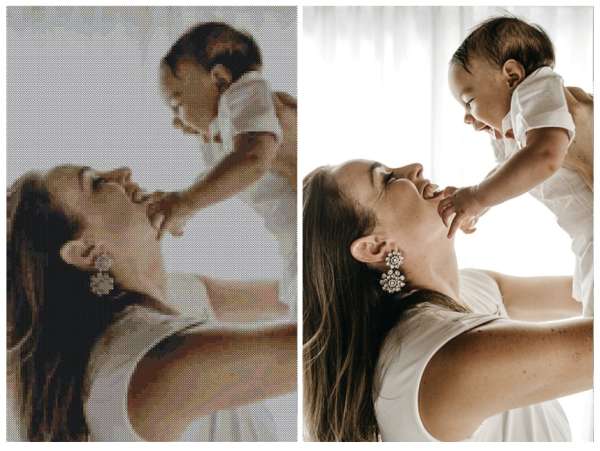
One of the most common questions I see online when it comes to designing patterns is how to turn a photo or drawing into a cross stitch pattern. It’s not actually that difficult, especially if the project isn’t too detailed, but there are also some ways to make it easier.

If you want to draw it out yourself by hand, these instructions from WikiHow cover the basics. You’ll need a light box (or a window) to help you trace the general outlines of your design and sketch in any details. You’ll also need gridded paper of the same count that you plan to use for your design (this helps get the scale right), which you can find here.

Once you have the general outline you’ll have to decide if you want to use partial stitches to follow the exact outlines of shapes or shift the design a little to keep with whole stitches. You can also pick your colors and choose to color in the chart or use different symbols to indicate the different colors (or both!).

If you don’t want to have to draw your cross stitch pattern out completely on your own, you can use a program like StitchFiddle to do it for you. With StitchFiddle you can choose your craft (knitting, crochet, cross stitch and more) and the brand of floss you use, then upload a photo or start with a blank chart to make your own design. You can even make QR codes to stitch.

You can alter the number of colors, the fabric count and the size and it will adjust your chart accordingly. (I don’t think you can save without an account, but it’s fun to play with to see what your chart will look like before you subscribe.)

Another option is to have someone else make the chart for you. This is a service that DMC offers on its website. You just upload your photo and indicate what size fabric you want to use. Then you’ll either pay for the chart itself, or they will send you the chart for free if you buy all the thread for the project at the same time.

Have you ever made a cross stitch chart from a photo or drawing? I’d love to hear your tips!

[Photo: DMC]
«
»

Have you read?

How to Add Text to a Cross Stitch Project

One of the easiest ways to make a cross stitch project more personal is to add text to it. Whether you’re adding the names of people getting married to a generic floral cross stitch design, birth information to a project on theme with the new baby’s room or just adding a word or phrase that’s meaningful to you, adding words to cross stitch projects make them that much more special. 

But if you’re not working with a project that already has text built in, or you want to change the text that’s there, that can feel a little daunting. 

Caterpillar Cross Stitch has a great guide to adding names and words (as well as numbers) to projects, which talks you through what to consider and how to actually go about adding text to a cross stitch project successfully. 

You’ll need to think about what kind of font you want to use and if you’re using back stitched letters or larger filled letters, how much space you need and how the letters work together in the text you’re planning to make sure it’s readable. 

Their post includes common pitfalls such as running out a space or ending up with text that’s off center and how to avoid them (spoiler: chart out your text before you stitch!). 

The whole post is really helpful if you’ve never added lettering to a project before and don’t know where to start. I like to use block letters in back stitch when learning how to add text to cross stitch, but of course there are tons of lettering options. Check out this collection of cross stitch fonts if you want to see some different things you can try. 

And head over to Caterpillar Cross Stitch to get more tips for how to successfully add lettering to your cross stitch projects. They also have their own alphabet and number charts you can buy to add text to your stitching. 

Have you ever added text to a cross stitch project? I’d love to hear how it went!

[Photo: Caterpillar Cross Stitch]

Categories

Book Reviews Christmas Craft Businesses Craft Inspirations Craft News and Events Cross-Stitch Patterns & Charts Cross-Stitch Product Reviews Cross-Stitch Website Reviews Dogs & Cats Easter flowers Free Patterns Halloween More Cross Stitch Product Reviews spring Subversive Thanksgiving Tutorials and Patterns valentines day

RSS feed: More Articles More Articles

  • FREE Dripping Font for Halloween
  • How to Create Easy Halloween Art Journal Pages
  • Etsy Feature – Pottery Travel Mug Template Set (3 Pieces)
  • Michaela McMillan: Weaving Stories into Sculptural Art
  • How to Add Text to a Cross Stitch Project
  • Beyond Basic Pumpkin Knitting Patterns
  • The Goldfish by Henri Matisse Advanced Cross Stitch Kit Review
  • Make To Donate: Crochet Chemo Cap Patterns
  • 32 Halloween Silhouette Digital Stamps and Die Cuts
  • 12 Free Baby Booties Sewing Patterns – Easy Fabric Shoes for Newborns & Babies

Pick Your Blog

  • Sewing
  • Knitting
  • Quilting
  • Crochet
  • Home & Garden
  • Recycled Crafts
  • Scrapbooking
  • Card Making
  • Polymer Clay
  • Cross-Stitch
  • Edible Crafts
  • Felting
  • Glass Art
  • Indie Crafts
  • Kids Crafts
  • Jewelry Making
  • Lesson Plans
  • Needlework
  • Bath & Body
  • Party Ideas
  • Candle Making
  • DIY Weddings
  • Not Craft
  • Free Craft Projects

Copyright © 2026 · CraftGossip | Start Here | Contact Us | Link to Us | Your Editors | Privacy and affiliate policy